The goal
- Increase conversion among non-paying users — 90% of whom are under 35.

Redesigning dating from passive matching to active coordination — turning matches into real plans through shared intent and availability.
00 · OVERVIEW
Designing for readiness,
not just proximity.
This project began with a speculative brief inspired by the Bumble Customer Acquisition Team, given as part of a course project. The initial mandate was transactional: leverage precise location data and timely notifications to convert non-paying users into subscribers.
I reframed the opportunity around coordination — moving location out of the UI and into system logic — so premium value is tied to mutual readiness and lower-friction scheduling, not “nearby” alone.
01 · CHALLENGE
The original mandate paired a clear business goal with a proximity-led hypothesis. It assumed nearby would motivate real-world meetups, before anyone checked if that was true.
The original mandate
02 · Research
The brief called for proximity features to boost engagement. But before jumping into design, I looked at the provided 2025 analytics to check whether proximity alerts were even working. They weren’t. Engagement had dropped from 18% to 6% in six months, meaning users being "nearby" wasn’t translating into them actually doing anything.
Engagement with proximity alerts
Six months ago
18%
Today
6%
Net change
−12 pts
in six months. Whatever nearby promised, it stopped delivering.
The why behind the drop
To understand the gap, I synthesized themes from public dating subreddits and community forums. Three patterns kept showing up.
People shown as nearby are often not actually local or available. The map lies a little. Time wasted compounds into churn.
Users like each other, then stall on the manual work of scheduling. The interesting part of dating is delegated to the user.
Half a kilometer apart is geography. It says nothing about whether someone has the energy, time, or interest to meet.
Strategic read
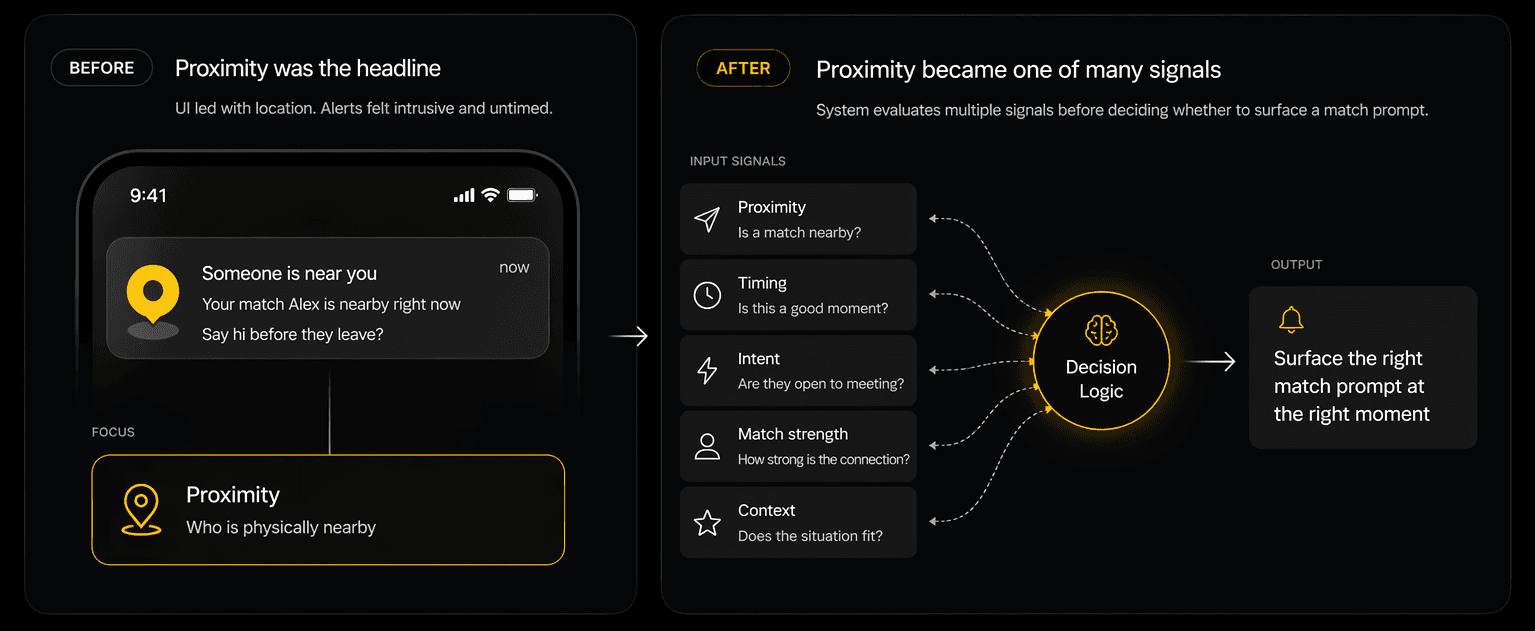
Proximity becomes one signal among many, not the headline. The headline becomes coordination, the part of dating people actually struggle with.
HMW question
“How might we help users recognize moments of shared readiness — moving beyond proximity to enable real meetups?”
03 · Validation
Fully automated scheduling felt invasive and reduced user control
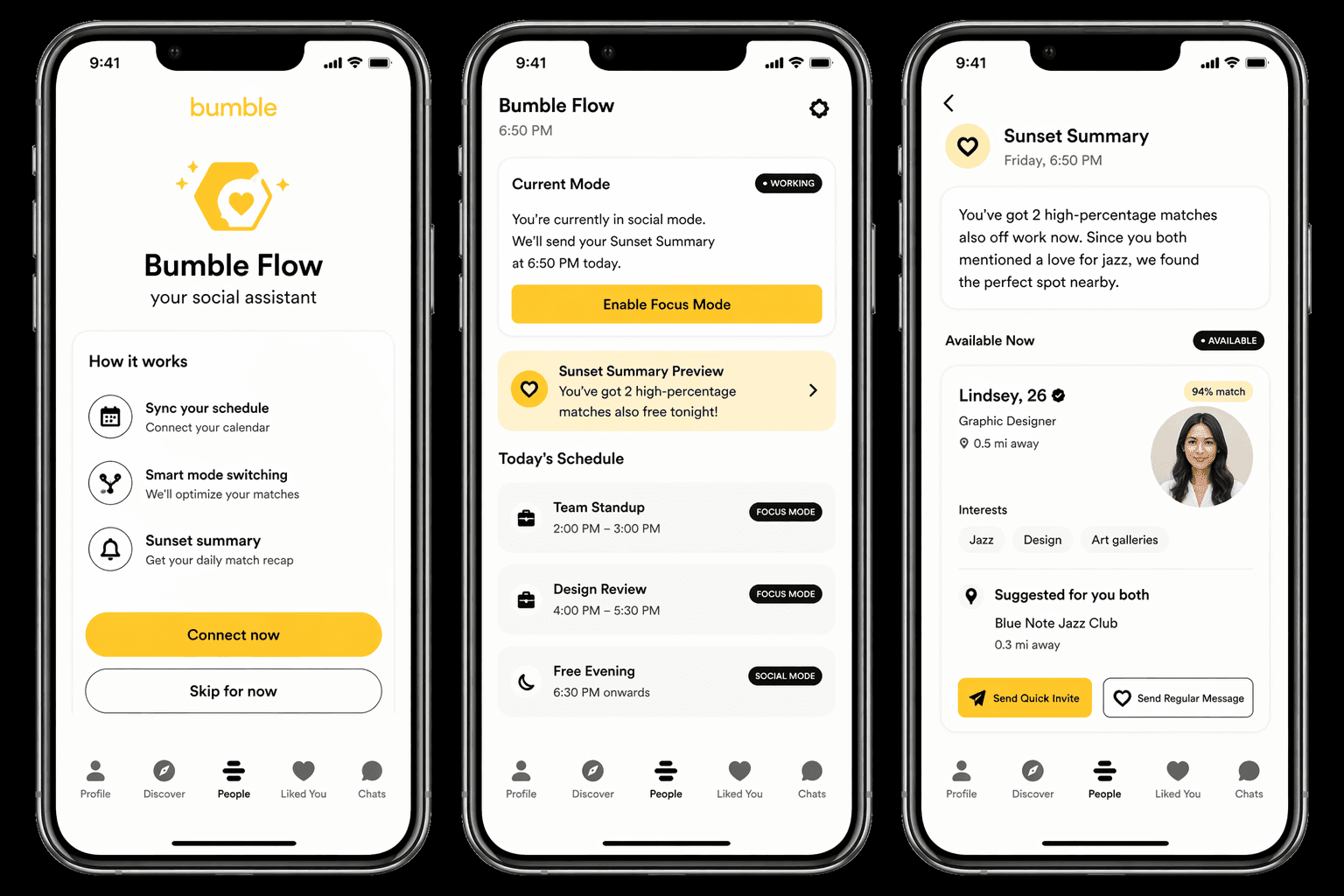
My initial concept fully automated same-day scheduling through calendar syncing. Testing showed that efficiency came at the cost of control — users felt overexposed, and real-time availability made interactions feel monitored rather than natural.
From testing, three key issues emerged:
User quote
“Wait, if I don’t sync my Google Calendar, this whole feature doesn’t work for me? That feels like a huge ask before I even know if the matches are good.”
User quote
“Just because I’m not in a meeting at 5 PM doesn’t mean I’m available. Sometimes I just need time to decompress before talking to anyone.”
User quote
“If someone thinks I’m free and nearby, it can lead to pushy ‘why can’t you meet?’ messages. I need the ability to say I’m busy without the app calling me a liar.”
Synthesis
The feedback converged on a single design principle: coordination should amplify mutual intent before it ever surfaces time — and premium value should not require surrendering privacy up front.
04 · Strategy
I pivoted from a system that found gaps in a calendar to one that aligns shared intent before surfacing availability.
FROM — CALENDAR-FIRST AUTOMATION
TO — INTENT-FIRST COORDINATION
Calendar gaps
Assumes an empty slot equals social readiness.
Intent-based
Users explicitly opt in to specific time windows.
All-or-nothing
Requires full calendar sync to unlock value.
Flexible entry
Manual input or privacy-first sync — your choice.
Exposed
“Available now” markers remove the ability to decline discreetly.
Protected
Matches suggested without broadcasting real-time status.
Feature-locked
Value hidden behind a high-friction data request.
Incentivized
“Suggested Windows” for all; Premium automates them.
05 · SOLUTION
The vibe coding pipeline
I connected my Figma file into Codex, where my design system and high-fidelity wireframes lived. I iterated with handoff-style instructions—structured prompts, screenshots of specific UI states, and MCP links—to guide layout, interaction logic, and edge cases.
The diagram below shows the full pipeline, from requirements to vibe coding.
Need Statement
Prioritized Requirements and Constraints List
Specifications List
PRD Prompt
Product
Requirements
Document
VIBE
CODING
06 · SYSTEM
Moving from “who is nearby” to “who is ready”
Bumble Flow transforms matching from a passive browsing experience into an active coordination engine. By prioritizing shared intent and real-time availability, the system removes the “scheduling labor” that often causes matches to stall, creating a clear, low-friction path from conversation to a confirmed plan.
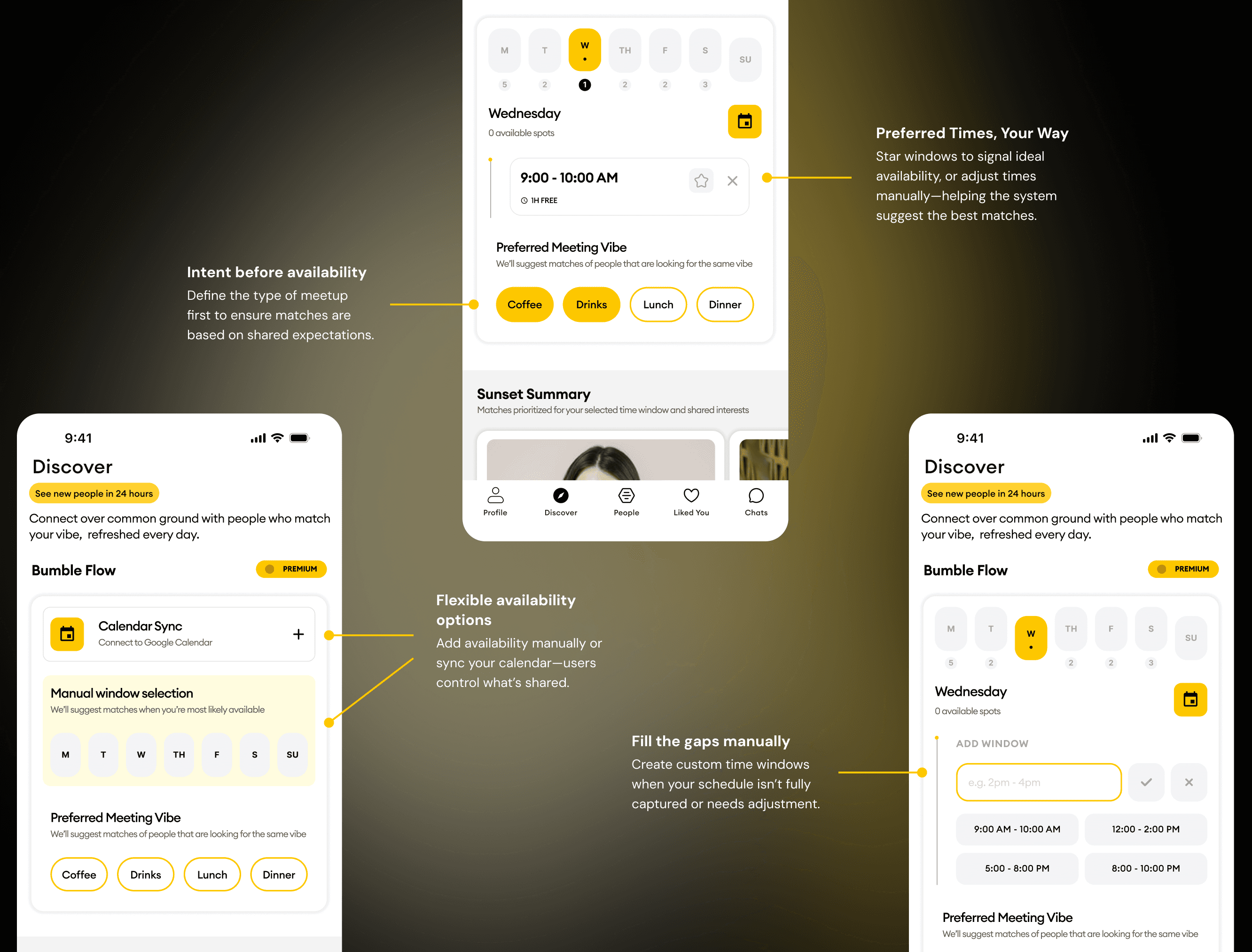
Users select a preferred meetup type — like coffee or drinks — so both parties align on expectations before messaging begins.
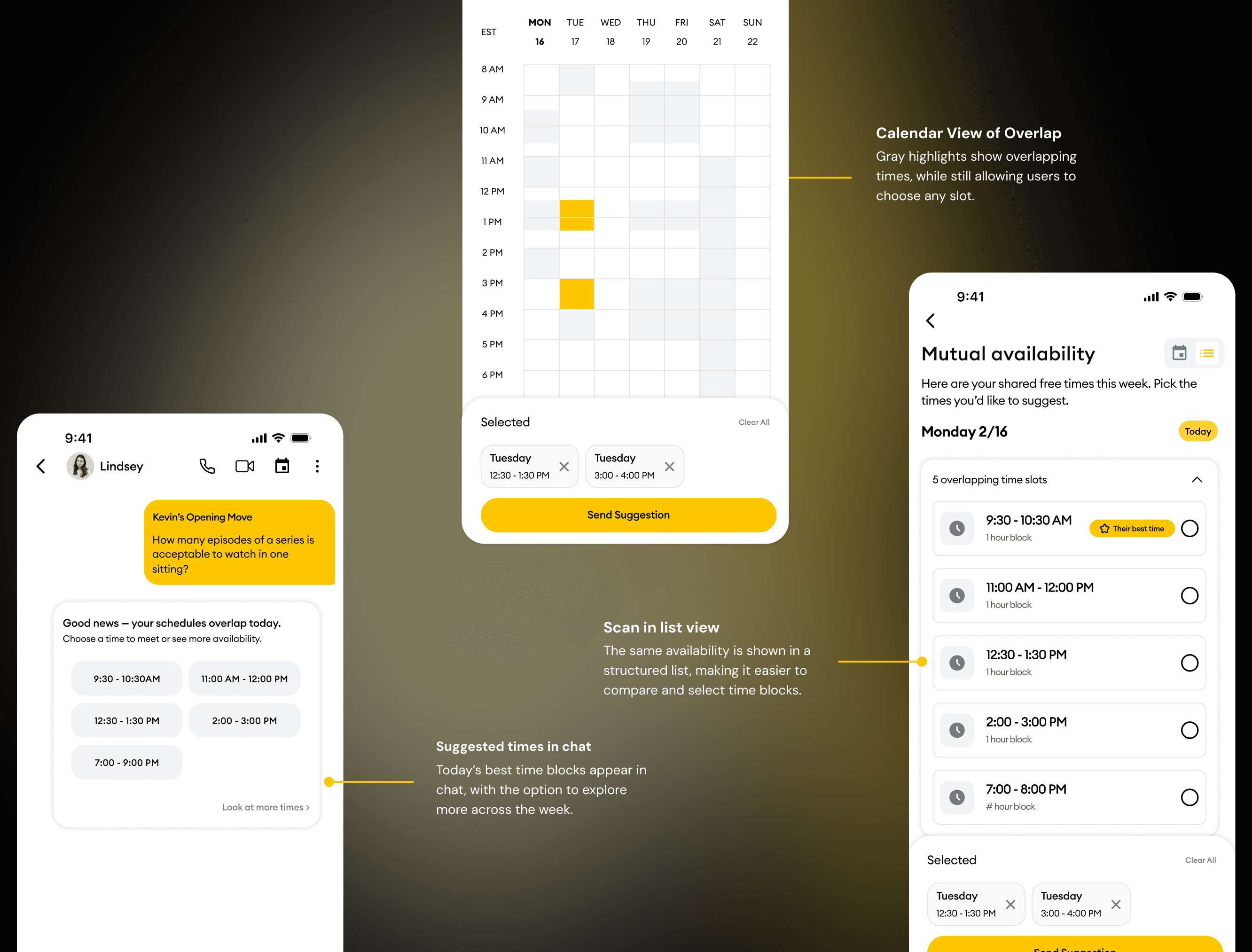
The system reconciles calendar data to surface overlapping free blocks in chat, so users can suggest or accept times in a single tap.
Premium users get full calendar automation and precision; free users are nudged toward coordination with general time-of-day suggestions.
Users input when they’re available and what they’re looking for — combining manual controls, calendar sync, and preference signals to shape matches and time suggestions.
Shared availability surfaces across chat, calendar, and list views — helping users compare options quickly, select a time, and move from conversation to a confirmed plan.
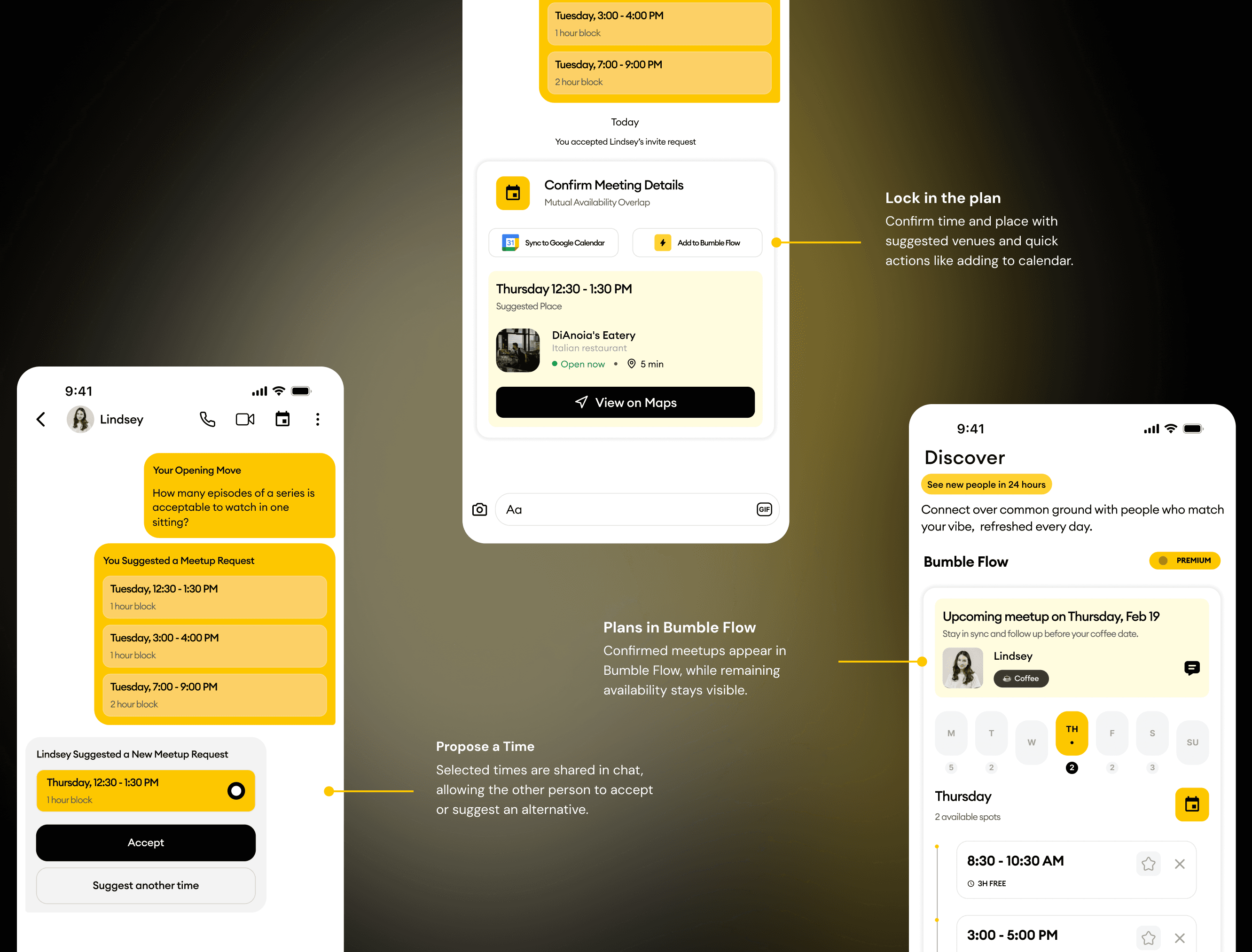
Users move from selecting a time to committing to a plan — proposing, confirming, and managing meetups while keeping availability flexible for future coordination.
07 · Decisions
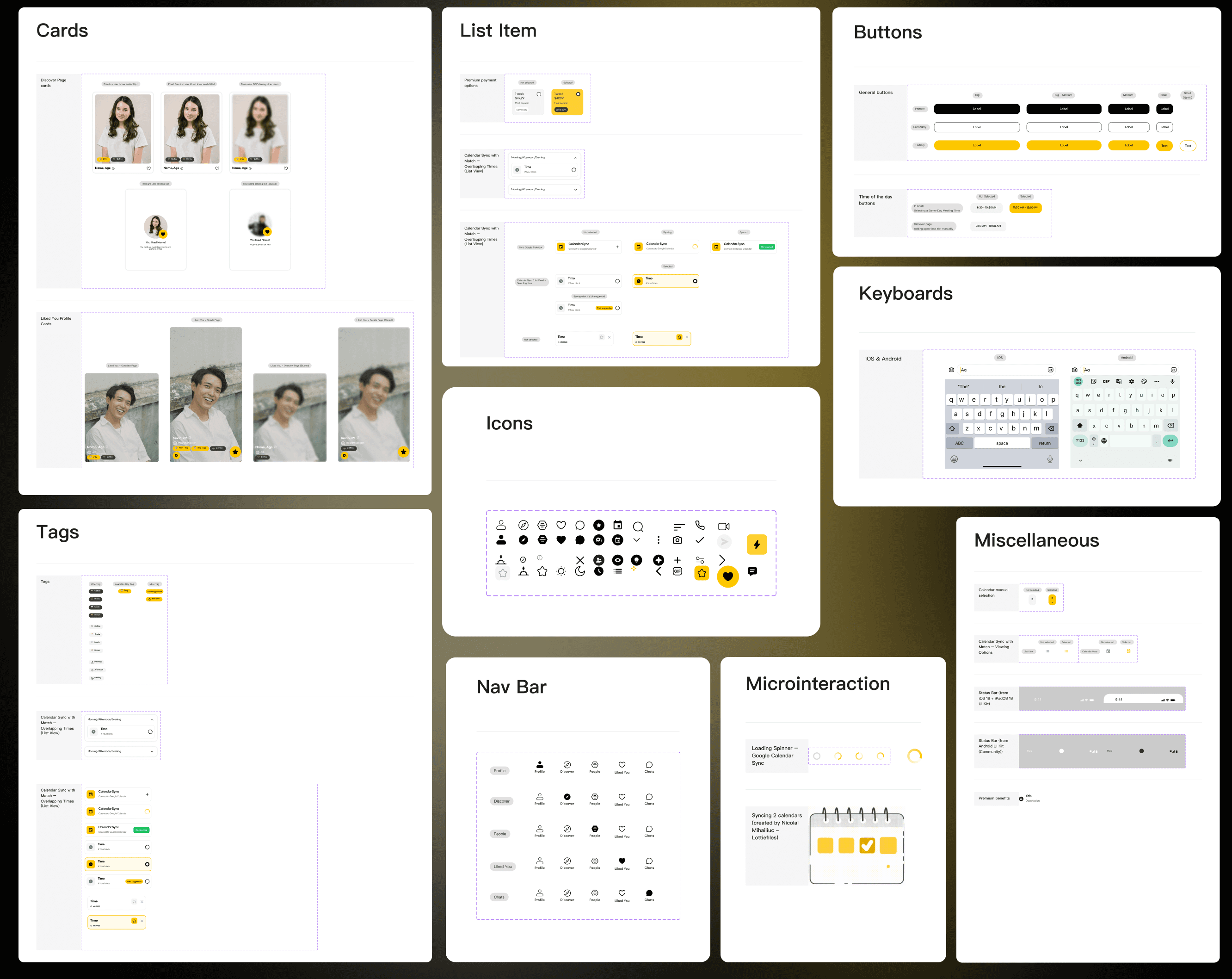
The Bumble Flow design system ensures consistency and efficiency through components, guidelines, and patterns — so flows for availability, chat coordination, and subscription surfaces stay coherent as edge cases multiply.
08 · Reflection
This project pushed me to balance user empathy with business goals more intentionally. By reframing the problem from proximity to coordination, I addressed real user pain — like the awkward gap in scheduling — while creating a clearer path for premium value.
Shifting from proximity to coordination uncovered scheduling friction and required clear differentiation across Premium, Free, and mismatched availability states.
Availability is sensitive. Interactions were designed to feel safe and controlled, without exposing or broadcasting personal data.
I used an iterative AI workflow with Figma as the source of truth, guiding outputs through clear instructions, screenshots, and checkpoints like collaborating with a teammate.
More case studies